
7Exception keywords
Owner's and installer's guide · edition 2026-11-23 · firmware 2.4.22
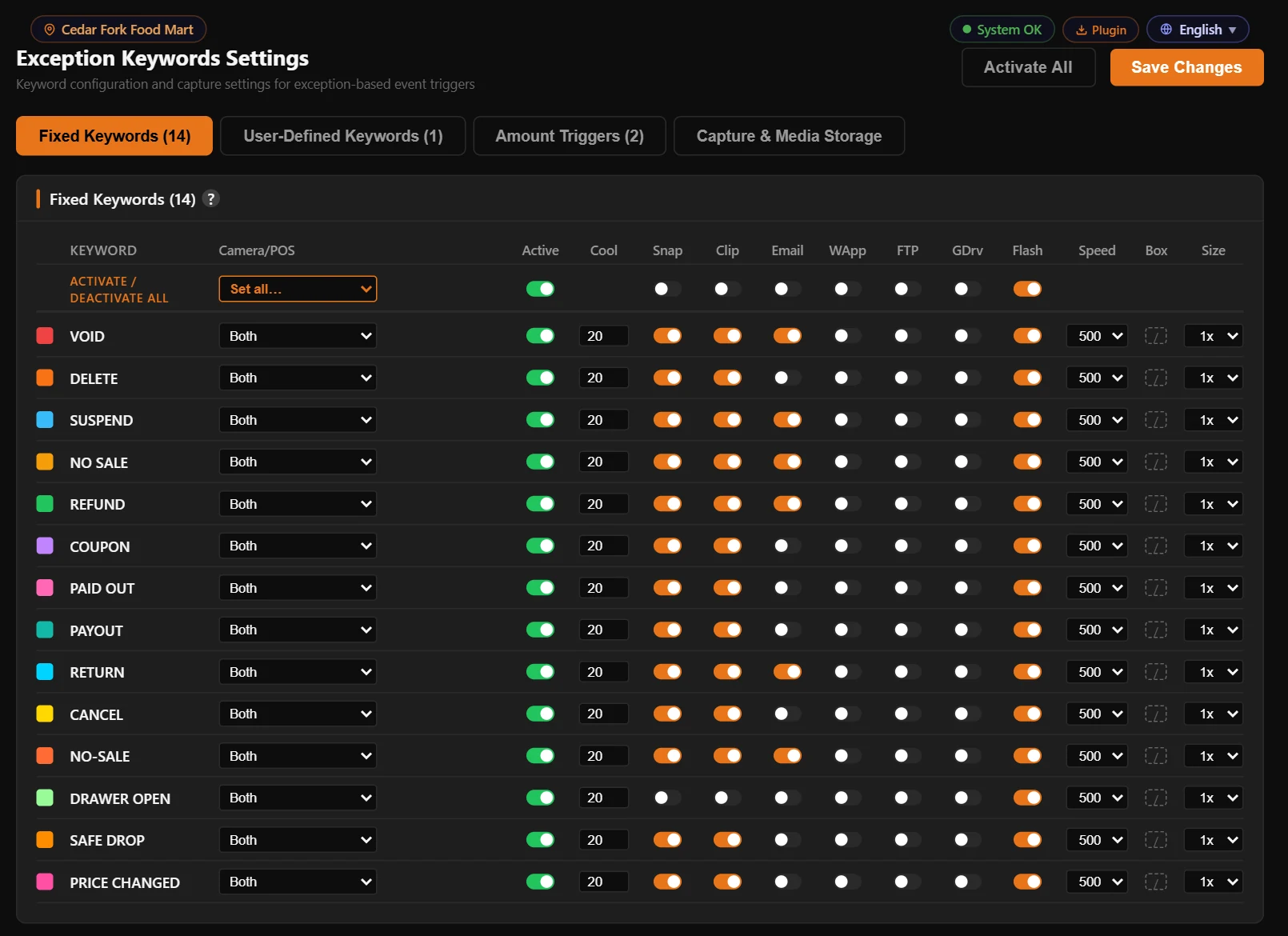
An exception keyword is a word on the receipt that you want to know about: VOID, NO SALE, REFUND. Every time the register sends that word, the unit colors the line on the video, keeps a snapshot and a clip of the moment, lists it in Search / Logging and, if you ask for it, sends you an alert. You decide which words count, under Settings › Exception Keywords.
 1
2
3
4
5
6
7
8
9
What the words mean at the counter
| Keyword | What happened at the register | Why you may want to see it |
|---|---|---|
| VOID DELETE CANCEL | An item, or a whole sale, was taken off after it was rung up. | The classic: the customer pays cash and leaves, then the sale disappears. |
| NO SALE NO-SALE DRAWER OPEN | The cash drawer was opened without a sale. | Making change is honest. A drawer that opens with nobody at the counter deserves a look. |
| REFUND RETURN | Money was given back. | Was there a customer? Did the goods come back? |
| PAID OUT PAYOUT | Cash left the drawer for a lottery prize, a delivery or a small purchase. | Is the winner, or the driver, in the picture? |
| SUSPEND | A sale was parked to be finished later. | A parked sale that is never finished is goods that left without payment. |
| COUPON PRICE CHANGED | The price was lowered by hand. | Discounts for friends. |
| SAFE DROP | Cash was moved from the drawer to the safe. | Usually just for the record: it shows the drop really took place. |
Your own keywords
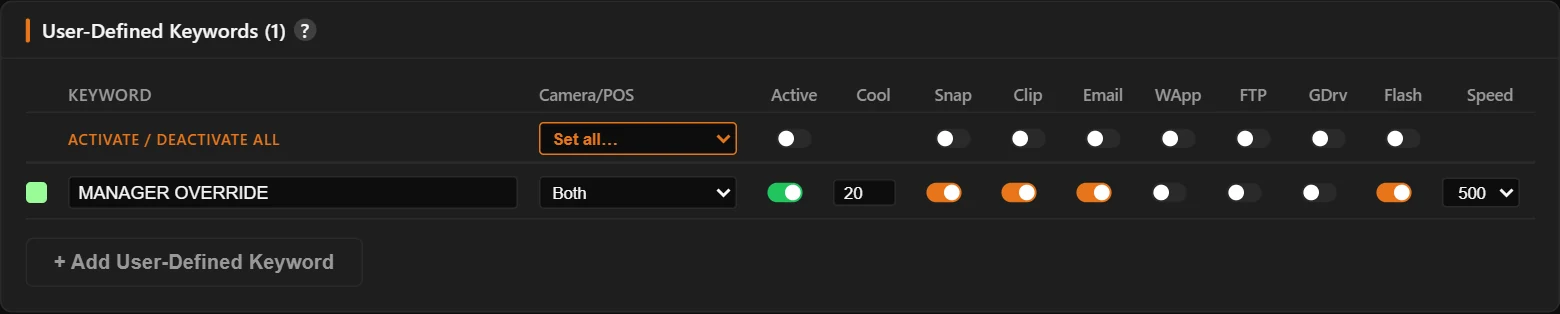
Press + Add User-Defined Keyword, type the word or words in capital letters, choose its color and switches as above, and Save Changes. You can add up to 16. Good candidates are whatever your register prints when a rule is bent: MANAGER OVERRIDE, PRICE OVERRIDE, EMPLOYEE DISCOUNT, AGE CHECK SKIPPED.
Amount triggers
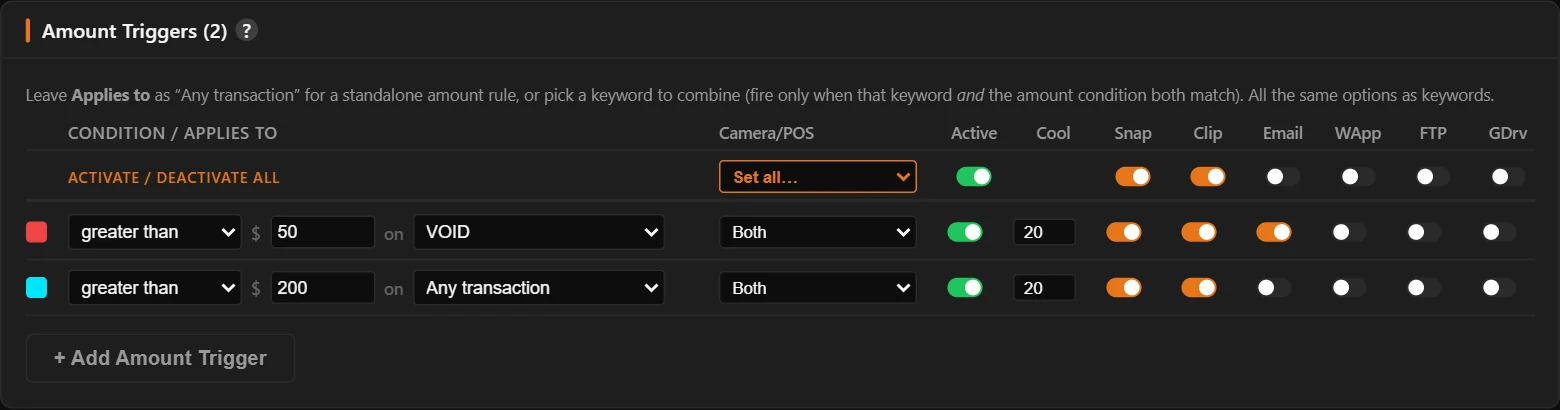
An amount trigger watches the money instead of a word. Choose greater than, less than or equal to, an amount, and what it applies to:
- Any transaction: every sale above (or below) the amount. In Search / Logging it shows up as, for example, AMOUNT > $200.
- A keyword: only when that word and the amount come together. VOID greater than $50 leaves the small corrections alone and tells you about the large ones.
How much is kept, and for how long

| Setting | What it does |
|---|---|
| Pre-Buffer and Post-Buffer | How many seconds of video a clip holds before and after the keyword. With 5 and 10, each clip shows the 5 seconds that led up to the moment and the 10 seconds that followed. |
| Snapshots (days), Video Clips (days) | After this many days the unit removes them by itself, every night. A unit with larger storage keeps them longer: up to 120 days of snapshots and 45 days of clips, as it is delivered. |
| Text Events (days), Text Logs (days) | How long the list of exceptions and the text of every sale stay searchable: 180 days, as delivered. |
| Disk Quota (%) | The share of the unit's storage that snapshots and clips may fill. When it is reached, the oldest go first. |
Your recorder keeps recording everything, as always. What the unit keeps is the short list that matters: for a moment older than its clips, note the date and time in Search / Logging and play that minute on the recorder.
- Leave all fourteen keywords Active, with Snap and Clip on. They cost nothing until you look at them.
- Tick Email for three only: VOID, NO SALE and REFUND. Too many alerts are soon ignored.
- Add one amount trigger, VOID greater than $20, with Email on, and after a week take Email off the plain VOID if it turns out to be too much.
- Save Changes. Then ring a NO SALE yourself and see it arrive: on the video, in Search / Logging, and in your inbox.
In the still pictures of this guide the keyword lines are shown steady, so that they can be read. On your video they flash, unless you switch Flash off for that keyword.