
4The Dashboard at a glance
Owner's and installer's guide · edition 2026-11-23 · firmware 2.4.22
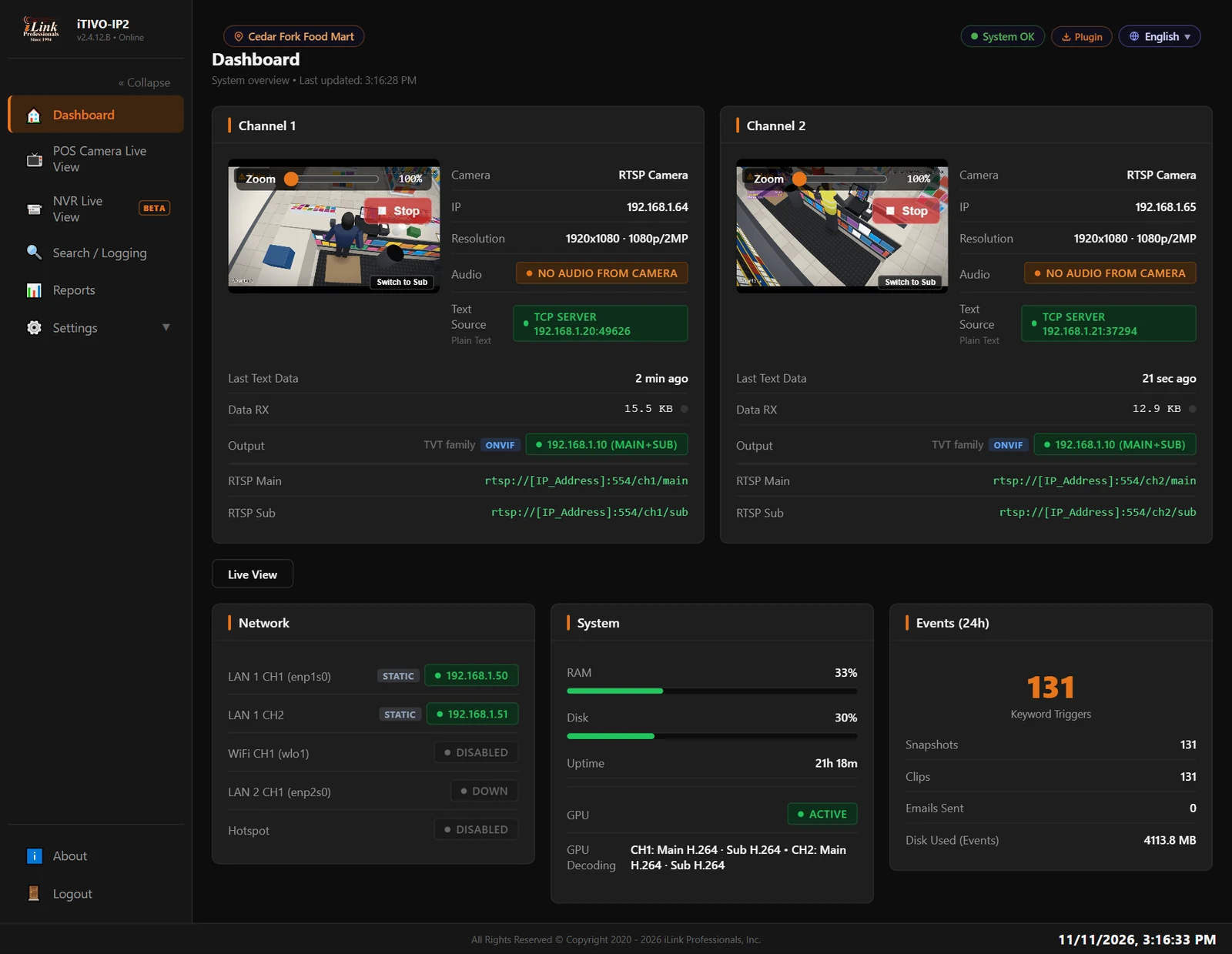
The Dashboard is the first page after you sign in. It answers one question in a few seconds: is everything connected and working right now?
 1
2
3
4
5
6
7
8
1The register camera, live. Click the picture to play it. It is the picture your recorder receives, with the receipt text on it. Double-click for full screen.
2The camera: what it is, its address, the size of its picture and whether it sends sound.
3The register. A green Text Source means the register is connected. Last Text Data tells you how long ago its last line arrived.
4The recorder. A green Output with an address means your recorder is taking this picture, text included. Click it to see every device that is watching.
5Network: the unit's own addresses, one for each channel, on LAN 1 and, if it is used, on LAN 2; Wi-Fi if it is used.
6System: memory, disk space and how long the unit has been running.
7Events (24h): how many exception keywords were rung up in the last 24 hours, and the snapshots, clips and e-mails they produced.
8System OK: the page is talking to the unit.
Read it like a traffic light
Green is good everywhere on this page. These are the things worth a second look:
| You see | It means | What to do |
|---|---|---|
| Last Text Data shows hours, while the store is open and selling | The register's text is not reaching the unit. The video is still recorded, but without the receipt, and no exceptions are marked. | Chapter 13, “No text on the video”. This is the one to act on the same day. |
| Text Source is not green, or says Waiting | The register is not connected to the unit: it is off, restarting or unplugged from the network. | Check the register. If it is running and selling, call your installer. |
| Output says No NVR or Device Connected | The recorder is not taking this channel's picture, so it is not being recorded with the text. | Is the recorder on? If it is, call your installer. |
| The preview stays dark, or the card says Offline or Reconnecting... | The camera's picture is not reaching the unit. | Check the camera's cable and power. Give it a minute after a power cut. |
| The Disk bar is amber or red | More than 70 % (amber) or 90 % (red) of the unit's storage is in use. | Nothing urgent: the unit makes room by removing its oldest snapshots and clips. You can keep them for fewer days; see chapter 7. |
| System OK turns into API Offline | This page has lost touch with the unit, most often because the internet between you and the store dropped. | Wait a moment and refresh the page. |
The one-minute check before the morning rush
Dana opens Cedar Fork Food Mart at 5:30. The owner is still at home. On the phone, the bookmark with the Remote address opens the Dashboard:
- System OK is green: the unit is up and the store's internet works.
- Both previews play, and show Counter 1 and Counter 2 the way they should look, not a camera that was bumped during cleaning.
- After the first coffee is sold, Last Text Data on Channel 1 says a few seconds: the register is sending.
- Both Output rows are green: the recorder is recording what the unit sends.
- Events (24h) is about what it is every day. A number far above the usual is a reason to open Search / Logging (chapter 6) and see what yesterday's late shift rang up.
Good to know
- The small preview is the camera's second, lighter stream. It starts fast and is easy on a phone's data plan. Switch to Main shows the full-size picture and asks first, because that uses much more data.
- No audio from camera only means that the camera sends no sound: it has no microphone, or sound is switched off in the camera. The picture, the text and the recording are not affected. When a camera does send sound, the unit passes it on to the recorder unchanged.
- Data RX counts what the register has sent since the unit last started. It going up is one more sign that text is arriving.
- RTSP Main and RTSP Sub are for your installer: they are the addresses a recorder uses to take this channel's picture (chapter 20).
- The Live View button under the cards opens the page of the next chapter.
- On an iTIVO-IP, the Channel 2 card is locked and offers Upgrade to iTIVO-IP2. iLinkPro Support can unlock the second register on the same unit.