
Skip to the content
iLink ProfessionalsLineSenseGUIDE
All topics (1 of 13)
  1. 1What LineSense does
  2. 2Where it works
  3. 3Before you start
  4. 4Where to put the cameras
  5. 5Set up the board
  6. 6Times, alerts and who is told
  7. 7Using the board every day
  8. 8A TV with no PC: HDMI
  9. 9Reports
  10. 10Where alerts and reports go
  11. 11How the times are measured
  12. 12When something looks wrong
  13. 13Setup checklist

LineSense › Guide › What LineSense does

1What LineSense does

LineSense times every customer from the moment they join a line until they reach the register, live, from the cameras you already have. When a line gets too long it tells the manager, by name, on their phone, with the camera's picture and what to do: open another register.
LineSense guide: What LineSense does
1 2 3 4 5 6 7
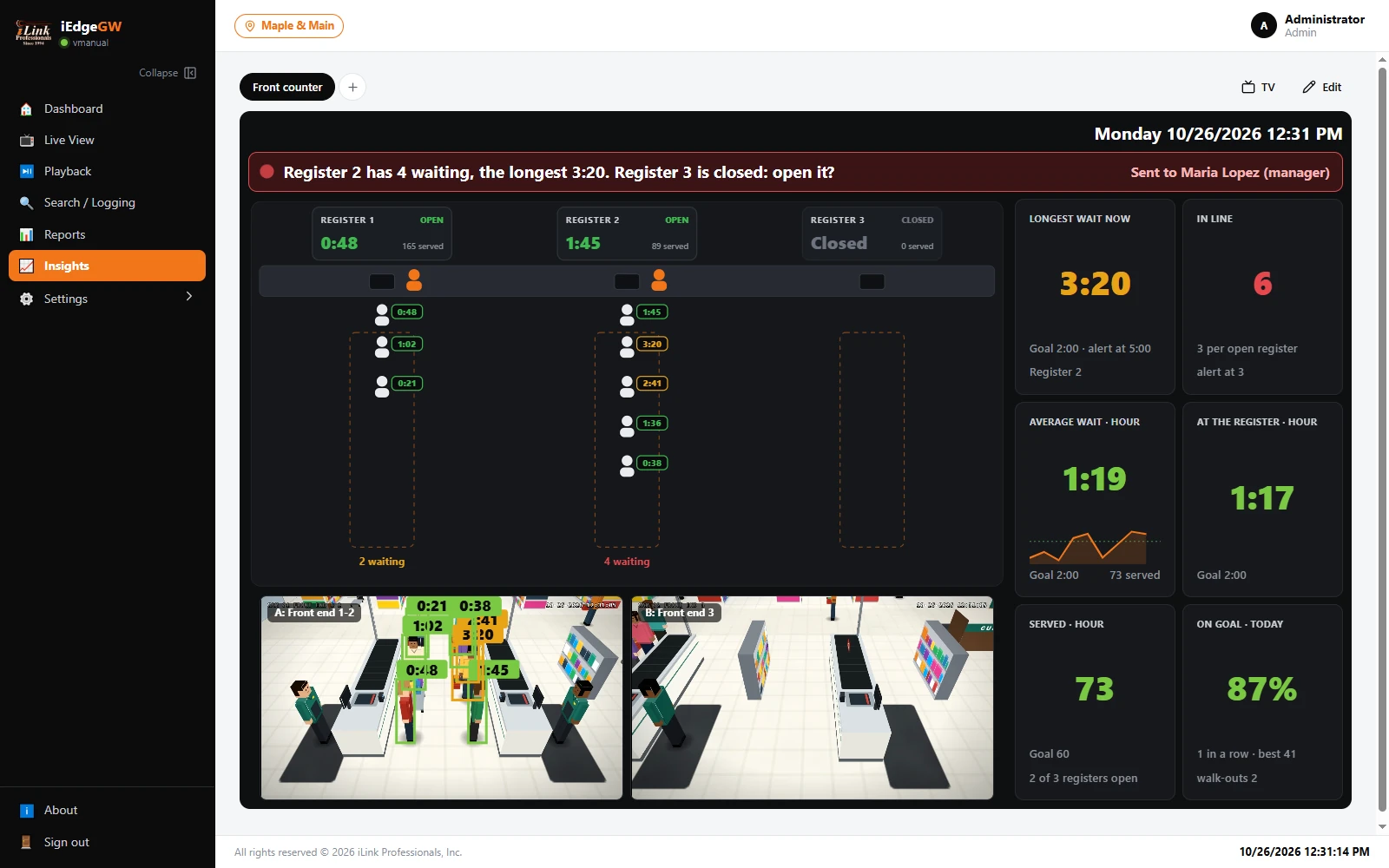
1The alert banner. What is wrong now, what to do about it, and who was told. Green when every line is on goal.
2Each register: open or closed, the customer at the register now and for how long, and how many it served today.
3The counter. Each register, and its cashier (orange) when someone stands in the cashier's place: that is how the board knows a register is open.
4Each line: everyone waiting, with their own wait, coloured against the goal.
5Tiles: the longest wait now, people in line (and per open register), the average wait and the time at the register this hour, customers served this hour, and the share on goal today.
6Up to three cameras, live, with each person boxed and their time on the picture.
7TV (full screen, for a screen at the front end) and Edit (the board's settings).

The colours

Every wait on the board is coloured against three times you set (section 6). For a store checkout the defaults are:

ColourMeansStore checkout default
GreenUp to the goal.0:00 to 2:00
AmberPast the goal: the line is getting slow.2:01 to 4:59
RedToo long: someone should act now (and the manager is told).5:00 and more

In the picture it is the lunch rush at Maple & Main. Register 1 is open with two waiting. Register 2 is open with four waiting, the longest for 3:20 (amber). Register 3 is closed. Three people waiting per open register is the store's alert level, so the board has told the manager, Maria Lopez, on her phone: Register 2 has 4 waiting, the longest 3:20. Register 3 is closed: open it?

What it is notLineSense counts and times people; it does not recognise them. It keeps no faces and no names, only the number of people and how long each waited. The video stays on the gateway, as it always does.

Stuck on a step?

iLink Professionals supports owners and installers. Call, or send us a message.