 Drive-Thru
Serve more cars
See the line build and act before it backs up. Every second saved at the slowest point is more cars through the window in your busiest hour.
Know how long every car waits at the menu board, the pay window and the pick-up window, while it is still in your lane. Drive-Thru SOS times every car with the cameras you already have and puts the whole lane on your kitchen TV, so the crew fixes the slow spot before the line backs up into the street.
A small iEdge Gateway box in the store reads the second stream of the cameras already on the lane, finds the vehicles, times them zone by zone, and drives the kitchen TV over HDMI. No ground loops, no headset tie-in, no camera settings changed.
A drive-thru earns its money one car at a time. When you can see every car's time, you can fix what slows it down.
See the line build and act before it backs up. Every second saved at the slowest point is more cars through the window in your busiest hour.
Menu board, pay or pick-up window: the board names the point that slows the lane down, by hour and by daypart.
Every car's time at every point, by daypart and by hour, with a picture of the car. Talk to the crew about real cars, not feelings.
It uses the cameras you already have. No ground loops cut into the asphalt, nothing added to the headsets, nothing to break in winter.
If cars line up at your window, they can be timed. The lane templates fit one window or two, tandem boards and dual lanes, and you name each point your own way.
Burgers, chicken, tacos, pizza: time the menu board, the pay window and the pick-up window, and know which one slows lunch down.
The morning rush is won in seconds. See the line build before it reaches the street, and open the second window in time.
A drive-up window, or a food program with its own lane: serve it as fast as you serve the counter.
Drop-off and pick-up lanes: see how long each car waits, and when the window needs a second person.
Teller and ATM lanes: wait times by hour, so the lanes are staffed when members actually come.
Short seasons and long lines: know your best hour and your slowest, and staff for both.
Drive-thru beverage and liquor stores, grocery and curbside pick-up: every car timed from arrival to hand-off.
You name the points your own way: the line, the pay station, the bay. The reports work the same.
Pick your lane. Each car is followed from the end of the line to the window, its time over it, green while it is on goal, amber when it gets close, red when it is over.
The classic drive-thru: one line, a menu board, a pay window and a pick-up window. A car with a big order is waved to the wait bay; its time there is counted on its own, and the cars behind it are not held up by it.
The gateway plugs into the kitchen TV with an HDMI cable. The crew sees the lane drawn live with every car on it, the times at every point, and the cameras with each car's time over it on the video.
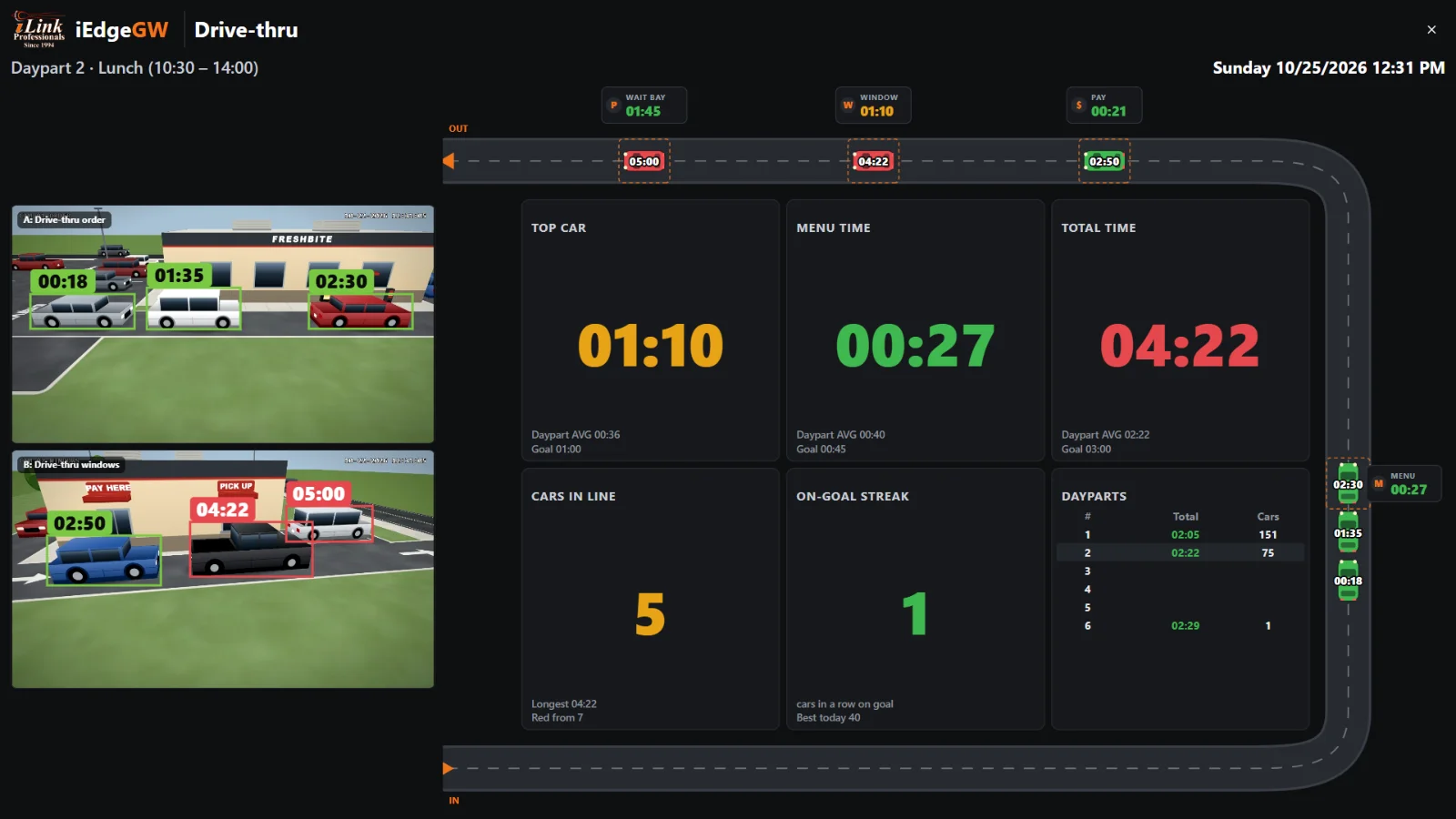
The board is a full-screen page served by the gateway: HDMI from the box to the TV, or any browser on the store network.
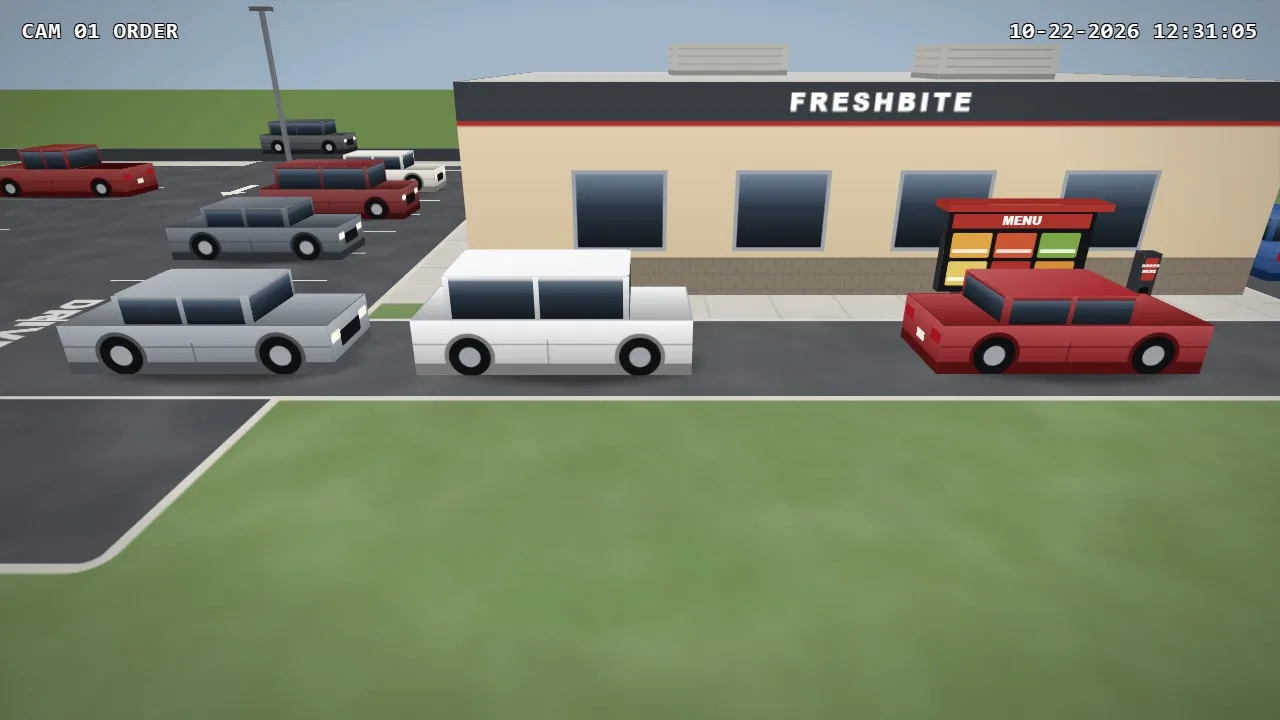 A: Drive-thru order
Each point has its own goal. Watch one car go through the lane: the clock at each point runs while the car is there, and the lane total runs from the first point to the last.
How long cars wait before they reach the menu board, and how many are waiting.
Order time. Slow orders show up here first, often at a new menu or a new crew member.
Payment time at the first window, or at the same window in a one-window store.
Hand-out time: the kitchen's speed, seen from the car's side.
Pulled-forward cars, counted on their own so they don't hide a slow window.
Set the limits once. The manager hears about a stuck car or a growing line while there is still time to fix it, on the board, by e-mail or on WhatsApp.
At any point, past the limit you set.
Lane 1: a car at Window for 2 m 00 s (over 120 s)Send someone out to take orders on a tablet.
Lane 1: 8 cars in line (8 or more)The average over the last minutes, not one slow car.
Lane 1: the lane total averaged 236 s over the last 15 minutes (goal 180 s)A customer who gave up before ordering.
Lane 1: a car left the line before ordering (3 today)Each car is logged with its time at every point, a picture at each stop, and a clip from that camera that starts 10 seconds before the car got there. Drive-offs and pull-forwards are marked. When a customer complains about a long wait, you look it up in seconds.
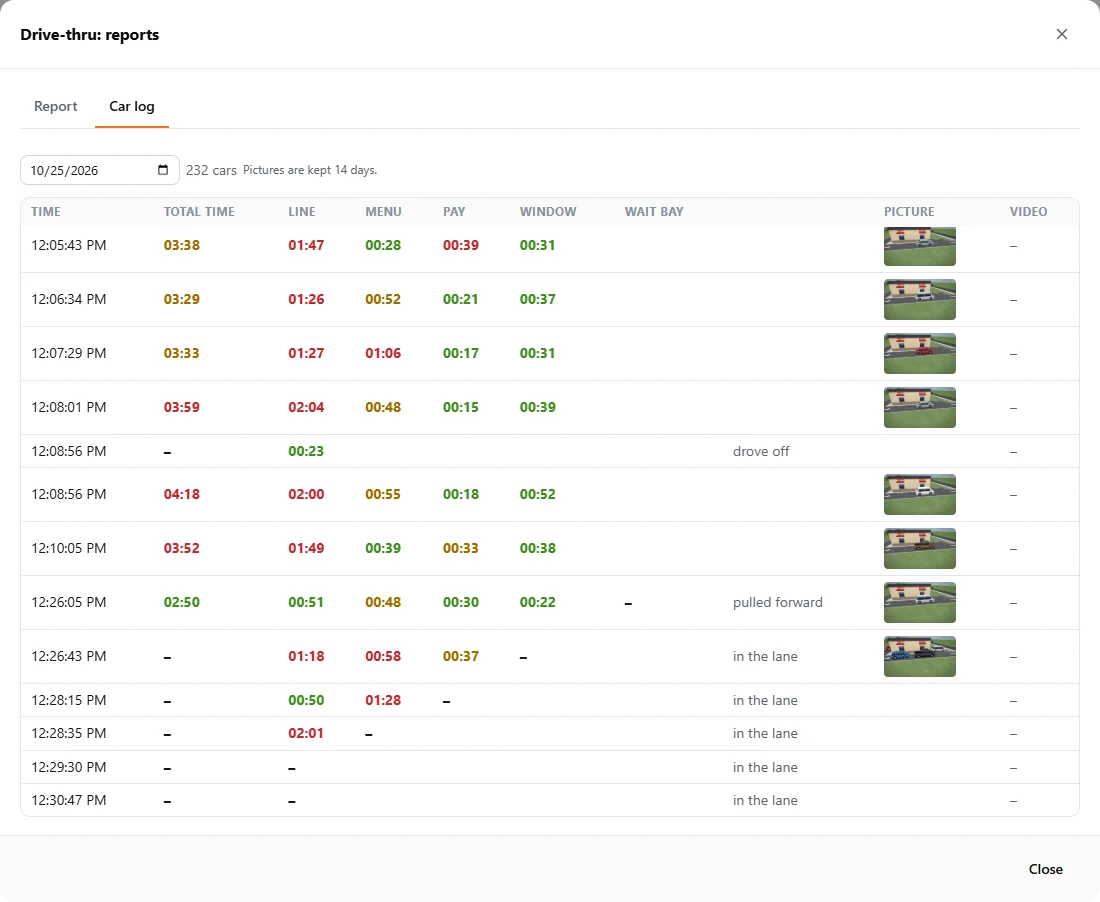
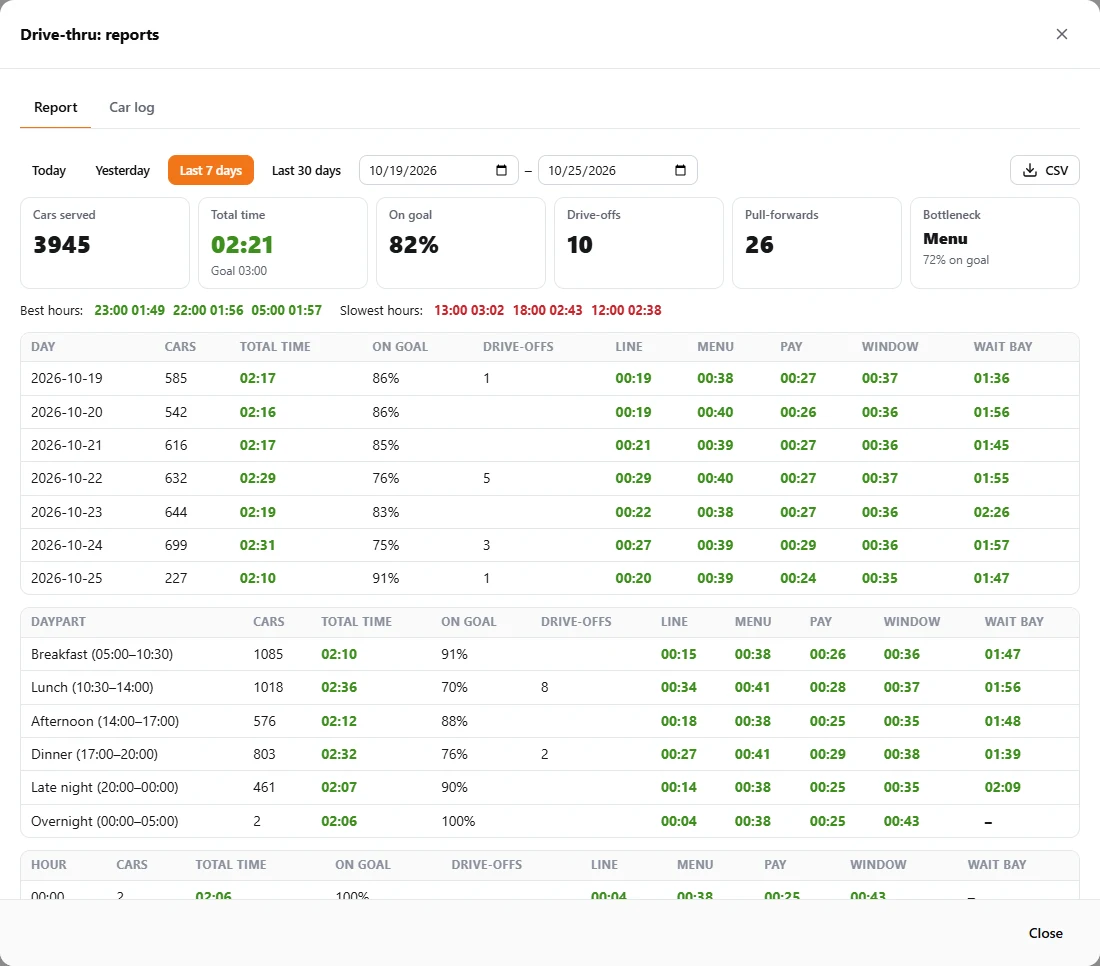
Daypart, hour and day reports with every point's average and longest time, the share of cars on goal, cars served, drive-offs and pull-forwards. Download them as PDF or CSV, or get them every day, week or month by e-mail and WhatsApp.
| Daypart | Cars | Total | On goal |
|---|---|---|---|
| Breakfast | 148 | 2:10 | |
| Lunch | 176 | 3:12 | |
| Afternoon | 84 | 2:12 | |
| Dinner | 132 | 2:32 | |
| Late night | 72 | 2:07 |
Cars in a row on goal, live on the board, with the best of the day beside it. Crews start racing their own record, and the lane gets faster without anyone shouting.
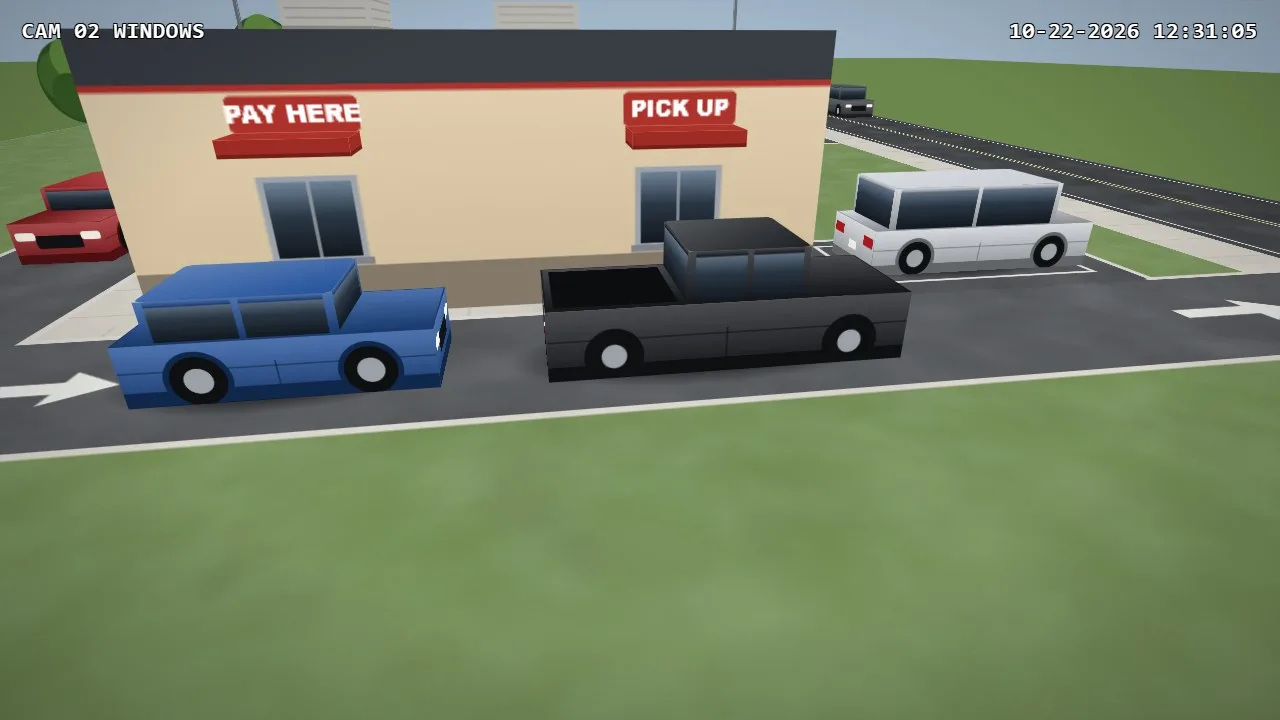 B: Drive-thru windows
Most drive-thrus already have a camera at the order point and one at the windows. If a camera has to be added or moved, the setup guide shows exactly where, with animated examples.
Pay
Pick-up window
Drawing the zones
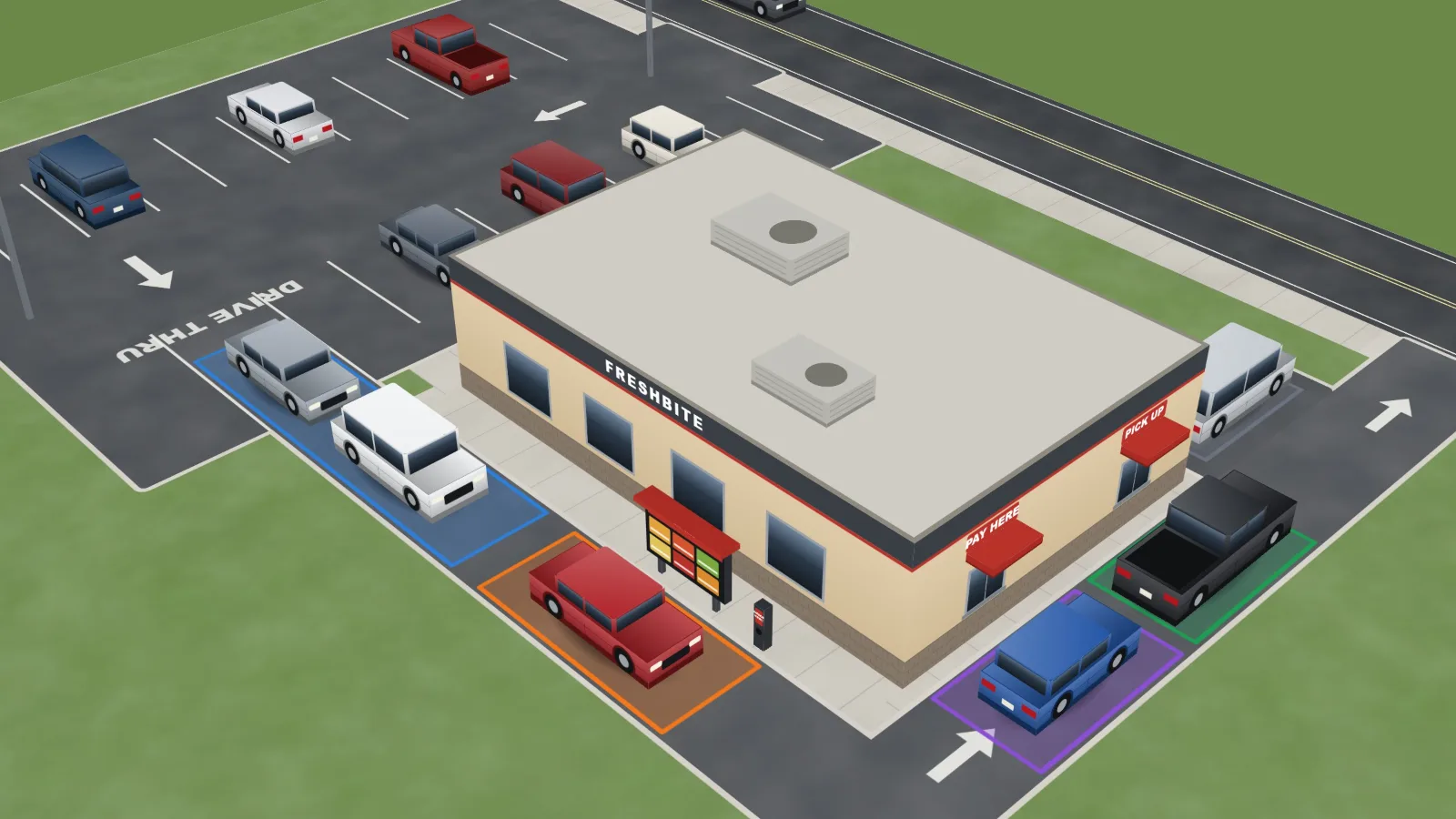
For each point, the installer draws where the car stands: on the ground where cars stop, past the front of parked cars. A car counts as inside when the bottom middle of its box is in the zone. The board then learns the lane from the cars themselves.
Single, one window, tandem, side by side or dual. The points come ready.
From the recorder or added directly. Up to three on the board.
Click four corners on the ground. The count inside shows at once.
A goal per point and for the lane, the dayparts, and the alerts.
| In the store | One iEdge Gateway box on the camera network. It does the timing, keeps the reports and drives the TV. |
|---|---|
| Cameras | Through Hikvision, Dahua, TVT and Uniview recorders, or ONVIF and RTSP cameras added directly, and many more. Up to three live cameras on the board. |
| Video it reads | The second stream, 704x480 or 1280x720 (not 352x288). It reads; it never changes the camera or recorder settings. |
| Display | HDMI from the box to the kitchen TV (TV mode), or the board in any browser. |
| Alerts and reports out | Pop-up on the board, e-mail, WhatsApp. Reports as PDF and CSV. |
| What it detects | Vehicles only. A car must be seen three times and stand 0.4 s in a zone; a stop counts after 2 s. |
| Kept on the box | Car pictures for 14 days (up to 1 GB); the times for the reports. |
Move the sliders to your store. This is arithmetic on your own numbers, an illustration, not a promise of results.
The gateway, the live board, the alerts and the reports, for one drive-thru location. It is in stock.
Or call 678-206-5465. In stock.
A front counter too? Both on one gateway: $1,495. LineSense times every customer in your checkout and counter lines and tells the manager which register to open. One box, one set of reports.
No. Drive-Thru SOS times cars with the cameras you already have. A small iEdge Gateway box in the store does the timing and drives the kitchen TV. No ground loops to cut in, nothing added to the headset system.
Cameras recorded by Hikvision, Dahua, TVT and Uniview recorders, and ONVIF or RTSP cameras added directly, and many more. It reads the camera's second stream at 704x480 or 1280x720 and never changes the camera's settings.
Single lanes, tandem menu boards, side-by-side order lanes that merge, and dual lanes, with one window (pay and pick up together) or two, and a wait bay for pulled-forward cars.
Usually one camera for the order point and one for the windows. The board shows up to three live cameras with each car's time over it.
A car must be seen three times before it counts, stand in a zone for at least 0.4 seconds and stop for at least 2 seconds. Sudden glare pauses the timing for 2 seconds instead of making up cars, camera shake is compensated, and a rain mode is built in.
By pop-up on the board, by e-mail and by WhatsApp: a car held at a point past its limit, too many cars in line, the lane total over goal for the last few minutes, and a car that left the line before ordering.
Times at every point by daypart, hour and day, cars served, share on goal, drive-offs, pull-forwards, the bottleneck, best and slowest hours, and a car log with a picture and a clip from 10 seconds before. Download as PDF or CSV, or receive them daily, weekly or monthly by e-mail and WhatsApp.
$995, one time, for the iEdge Gateway with the Drive-Thru SOS board, alerts and reports. There is no monthly fee for a single location. In many cases it uses the cameras you already have; you can also add 1 to 4 cameras with a motorized zoom lens when you order. A cloud service for owners with several locations is planned as a separate monthly plan.
No. The timing runs on the iEdge Gateway in the store. Alerts and reports go out by e-mail and WhatsApp when you turn them on.
We build and support video and point-of-sale systems for stores and restaurants. Drive-Thru SOS is engineered and supported in the US, by the same people who answer your call.
Tell us your lane type and the cameras you have. We will tell you what it takes, and show you the board on your own drive-thru.